
The file manager was just the beginning. What started as a practical sync problem has been deliberately shaped into a controlled environment for testing AI-assisted software engineering — before that system touches a single line of production code.
The Problem That Started It
Every engineer who manages deployments manually knows the friction: two directories that should match, a process to verify they do, and the nagging question — “is this already on the server?” The standard tools work. But the cognitive overhead compounds over a working day.
The setup was straightforward: a local Windows machine, a test server, a project directory that needed to stay in sync between them. No CI/CD pipeline, no shared network drive. Just files that needed to match on both sides before each test run.
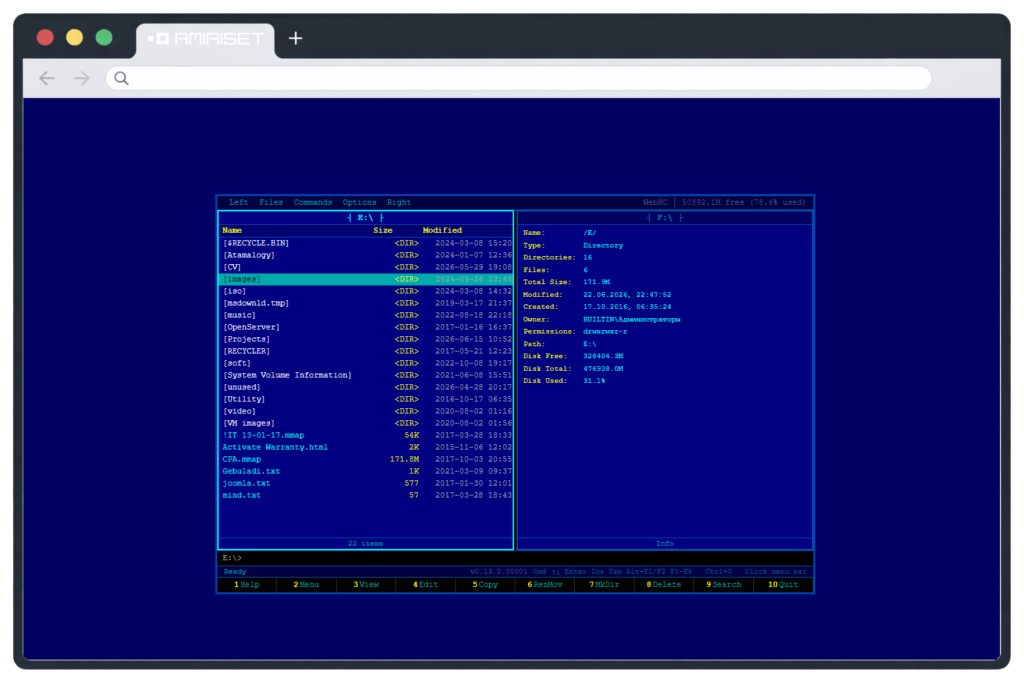
What you actually want is: left side — local. Right side — server. Differences highlighted. Press a key to sync.
That mental model is exactly what Norton Commander was built around in 1986. And it’s what WebNC started as.
The sync tool got built. But the project didn’t stop there — and where it ended up matters more than where it started. By Phase 1, WebNC had accumulated something more valuable than a working file manager: the architecture, documentation, test coverage, and build history that make it a viable testbed for AI-assisted engineering. That’s what this article is actually about.
The “What If” Spiral
The first constraint shaped the architecture: Node.js wasn’t installed on the target machine, and adding it was unnecessary overhead. The frontend had to work without a build step.
Solution: FastAPI backend, React 18 UMD served locally by the backend itself, Babel Standalone for JSX in the browser. No Node, no npm, no webpack. Everything at https://localhost:8000/. Zero-build by design, not by accident.
Milestone 001 delivered the skeleton: two-panel layout, keyboard navigation, full CRUD endpoints, multi-drive support via Alt+F1 / Alt+F2. The NC look — blue background, cyan/white/yellow, F-key bar at the bottom.
Then the “what if” questions started, and didn’t stop for seventeen milestones.
Security: What If It Needed Remote Exposure?
TLS 1.3 via Python’s cryptography library — no openssl CLI available on the target machine, so RSA-4096 cert generation happens at first run in pure Python. Then a proper zero-knowledge session model: token printed at startup to stderr only (never touches the rotating log file), ephemeral and RAM-only, frontend signs every request with SHA-256(nonce + timestamp + secret) via Web Crypto API, server validates signature and nonce for replay protection. The AuthProvider ABC keeps it extensible — the middleware calls authenticate() on whatever provider is configured. Currently console-token. AD, Kerberos, or JWT are a single implementation away.
Concurrency: What If a Directory Listing Blocked Everything?
Every blocking filesystem call went into asyncio.to_thread() via an operation queue. This came from a concrete failure: Path.exists() and .stat() called directly in async def handlers would block the event loop for 30+ seconds when hitting slow network drives or disconnected USB. All handlers froze — including /api/health — causing the monitor to kill and restart the server. The fix: thread pool wrapping throughout, with per-operation timeout and retry config in config.json, frontend polling /api/operation/{id} for status.
Platform: What If It Needed to Run on Linux?
Milestone 017 answered this architecturally rather than practically: FileService ABC with 14 abstract methods, WindowsFileService implementing all platform-specific code — ctypes, Win32 API, GetFileAttributesW. The API layer depends on the interface. Swap the implementation, keep everything else. Linux support becomes a bounded problem rather than a rewrite.
Stability: What If Windows Kept Crashing?
ConnectionResetError on every browser refresh, NotImplementedError on every subprocess call. Two separate root causes, two fixes: asyncio logger to CRITICAL plus Python 3.11.9 (which adds the fileno() != -1 guard that actually prevents the crash); WindowsProactorEventLoopPolicy with a monkey-patched new_event_loop for subprocess support. Neither fix is elegant. Both are necessary on Windows.
By Milestone 017, the original sync problem was solved ten milestones back. The project continued because each answer exposed a question worth answering.
What WebNC Actually Is — as a Project
This is not a throwaway script. This is a project with the same properties as real software products.
At the end of Phase 1, WebNC has roughly 18 000 lines of code across backend, frontend, tests, and documentation — built over seventeen milestones spanning several months. Concretely:
- a REST API covering 26 endpoints, fully documented
- a frontend across 15 React modules — zero-build, no Node dependency, React 18 UMD served by the backend
- a three-layer security model with an extensible provider interface
- a service layer with an ABC designed for cross-platform implementation
- async operations with configurable timeout and retry throughout
- 217 tests across 17 files (9 unit, 8 integration), 65% coverage — 100% on core infrastructure (
config_manager,vfs/paths, all Pydantic models,console_token), identified gaps on WinAPI-bound code that requires mocking platform surfaces - a full documentation suite: README, Architecture, API Reference, Codebase, User Guide, Security, Compliance, Troubleshooting, Repository Map, CHANGELOG
- 17 structured build summaries in
history/, each capturing goal, constraints, decisions, critical context
The test report matters here not as a vanity metric. 65% coverage with a clear account of why the remaining 35% isn’t covered — WinAPI surfaces, ThreadPoolExecutor internals, certificate generation — is a more useful signal than 90% coverage on easy paths. It tells you where the risks actually are.
That documentation and history infrastructure is also the important part for what comes next.
Why WebNC Is Being Shaped into a DevRag Testbed
WebNC was built as a utility. DevRag hasn’t touched it. That’s the point.
The question being set up is specific: can an AI-assisted engineering system work with a real, moderately complex legacy project — one that has accumulated history, architectural decisions, documentation drift, a test suite, and technical debt — without the project having been designed for AI consumption from the start?
Most “AI for developers” tooling is demonstrated on toy problems — summarize this file, generate a unit test, explain this function. The interesting problems are different. How do you maintain consistency between a growing codebase and its documentation? How do you audit what changed between builds and determine whether the docs still reflect it? How do you distinguish public-facing API changes from internal refactoring when generating a release summary?
These problems require a project that’s real enough to have the relevant complexity. WebNC qualifies — and it has accumulated exactly the infrastructure that makes this kind of testing meaningful rather than synthetic.
The history/ directory contains 17 structured build summaries in a consistent format. Not commit messages. Not ticket comments. Engineering memory in a format an agent can read and reason over. The M017 entry alone covers Python 3.11 migration, NDC Tree dialog, FileService ABC introduction, ConnectionResetError suppression — four distinct concerns with interdependencies and explicit rationale for each decision. That’s the kind of context that makes the difference between an agent that produces plausible output and one that produces accurate output.
This is the raw material for the test. It was produced by an engineer documenting a real project, not by a process designed to feed an AI system. That’s exactly what makes it a meaningful testbed.
The Procedures Being Designed
DevRag is being built around short, well-defined workflows with a clear input, a clear output, and a stop-point before any destructive action. WebNC is where these procedures will be validated against a non-trivial codebase for the first time:
docs-audit — given a diff between two build states, identify which documents are now inconsistent. The procedure reads the changed code, reads the existing docs, and flags discrepancies. The design assumption: it should know to check the Architecture document when module boundaries shift (as they did in M017 with the FileService ABC), the API Reference when endpoint contracts change, the Troubleshooting guide when a known issue is resolved. WebNC will be the first real test of whether that assumption holds.
close-build — collects the git diff from dev, generates a structured build summary in the established format, appends it to the history directory, runs the docs audit, commits. One procedure, one coherent output. The M017 summary — four concerns, documented consistently — is exactly the kind of entry this procedure is designed to produce. Whether it can reproduce that quality automatically is what the test will show.
release-prepare — checks that version is updated, CHANGELOG reflects only public-facing changes (not internal build notes), roadmap is synchronized with what’s actually implemented, documentation is consistent with the current API. A gate before a public release, not a checklist that gets skipped under deadline pressure.
These are procedures, not prompts. The distinction matters: a procedure has a defined entry state, a defined exit state, and produces verifiable output.
The Agents Being Defined
The current DevRag model defines three core roles. WebNC provides the surface area to test whether they can handle a non-trivial codebase:
Manager — owns the task lifecycle. Takes a goal, breaks it into scoped tasks, tracks state across builds. The test on WebNC: can it correctly scope “add Linux support” given the existing FileService ABC and the architectural context in history/? Or does it produce tasks that ignore the established service boundary?
Developer — implements against a task definition, with access to the codebase and its history. The test: given M017’s context — why WindowsFileService was isolated, what the ABC contract looks like — can it produce a PosixFileService implementation that respects those decisions rather than working around them?
Tester — validates the output against the established quality baseline. The test suite at 65% coverage with a clear account of gaps is exactly the kind of baseline this role needs. Whether the Tester agent can extend it meaningfully — targeting the WinAPI-bound gaps with proper mocking rather than just adding easy paths — is an open question.
Architect and Technical Writer are planned but not yet defined. When they arrive, WebNC will have concrete material waiting: 17 build milestones of architectural decisions to review, and a documentation suite that has already drifted at least once.
For Whom the Tool Is Useful Today
Setting aside the DevRag angle, the file manager itself fills a real operational gap.
There’s a class of administrative tasks — filesystem operations on remote machines, deployment sync, ad-hoc file management — that falls between “set up proper deployment infrastructure” and “open a terminal and figure it out.” Engineers in restricted enterprise environments, on legacy Windows infrastructure, or without access to full DevOps toolchains hit this constantly.
WebNC is specifically useful when:
- You need filesystem access to a remote Windows machine without setting up full RDP or SFTP
- Installing additional tooling on the target requires change management approval
- You’re doing iterative deployment and need visual diff between local and remote directory state
- You need auditable filesystem operations — every action logged, session auth required — without deploying enterprise tooling
- You’re debugging a production-adjacent system and need to read configs or check structure without terminal access
The security model is built for this. TLS 1.3, zero-knowledge session auth, extensible AuthProvider. Remote exposure via --host 0.0.0.0 behind a reverse proxy. Audit logging and read-only mode on the Phase 2 roadmap.
The threat model is explicit about what it doesn’t cover: it assumes a trusted authenticated user and doesn’t sandbox their actions. The security protects the channel and the session. It doesn’t protect a trusted user from their own decisions.
What Phase 1 Actually Means
Phase 1 isn’t a label — it’s a structural checkpoint. A project has completed Phase 1 when it can grow without chaos: when new features don’t require revisiting foundational decisions, when the test suite catches regressions before they ship, when the documentation can be audited rather than rewritten from scratch.
WebNC reaches that point with a layered architecture ready to accept a Linux implementation without touching the API layer. A test suite with a clear coverage baseline. A documentation suite that covers the system from user guide to threat model. A history directory that makes the project’s evolution readable — by engineers, and by agents.
The Norton Commander aesthetic was the trigger. The “what if” questions were the engine. But what was actually built is a platform: for the file manager to grow on, and for DevRag procedures to be tested against for the first time.
WebNC solved its original problem long ago. The remaining question is whether DevRag can understand a codebase it didn’t create — navigate its history, respect its architectural decisions, maintain the coherence of its documentation across builds it wasn’t part of.
That experiment starts now.